WhatsApp Quick Replies: Templates for Trades
To set up WhatsApp quick replies, open the WhatsApp Business app, go to Tools, tap Quick replies, write the message and set a shortcut. Then type “/” in any chat to drop it in, edit it and send. Below are 20 ready-made replies for UK trades, cleaners and removals firms.
TL;DR
- Quick replies live in the WhatsApp Business app: Tools, then Quick replies, then a shortcut you type after “/”.
- They are not automatic. You still open the chat, pick the reply, add the customer’s name and press send.
- The 20 replies below are grouped by moment: first reply, price question, photo request, booking, running late and after the job.
- Edit every reply before sending. A reply that sounds like a form letter loses the personal feel that wins small jobs.
- Once enquiries arrive while you are up a ladder or on a van, typed shortcuts stop scaling. That is when an AI agent should take the first reply.
Table of Contents
- How do I set up quick replies in WhatsApp Business?
- Are quick replies the same as automatic replies?
- What makes a good quick reply for a trades business?
- Which quick replies work for a first reply?
- What do I say when someone asks the price?
- How do I ask customers for photos?
- What should I send to confirm a booking?
- What do I send when I’m running late?
- What do I send after the job?
- When do typed shortcuts stop scaling?
- What does it cost to put an agent on WhatsApp?
- How do I make my WhatsApp replies faster?
- FAQ
- Sources
How do I set up quick replies in WhatsApp Business?
Quick replies are shortcuts for messages you send again and again. They can include media such as images and videos, and the WhatsApp Help Center says you can store up to 50. Media files are not supported on WhatsApp Web or Desktop, so if you want to attach a photo of your price list or a van, set that reply up on your phone.
The steps on your phone:
- Open the WhatsApp Business app and go to the Tools tab.
- Tap Quick replies, then add a new one.
- Type the message. Put the customer’s name placeholder at the start, for example “Hi [Name]”, so you remember to swap it.
- Tap Shortcut and choose a short keyword, such as quote or photos.
- Save it.
To use one, open a chat, type “/”, pick the reply from the list, change what needs changing and send. The same help page notes that the app also creates some default quick replies from your business profile, such as your hours and address, so check your profile is right first.
Two habits save pain later. Keep your shortcuts short and consistent (one word, lower case), because you will type them one-handed. And keep a copy of your important replies in a notes file: WhatsApp says a deleted quick reply cannot be recovered.
The app has other tools too, such as greeting and away messages, which are covered under WhatsApp Business app features. For how those automatic messages work in practice, see our guide to setting up a WhatsApp auto reply.
Are quick replies the same as automatic replies?
No. A quick reply only saves typing. Nothing is sent until you open the chat, choose the shortcut, read it over and press send. An automatic reply goes out on its own, for example when you are away.
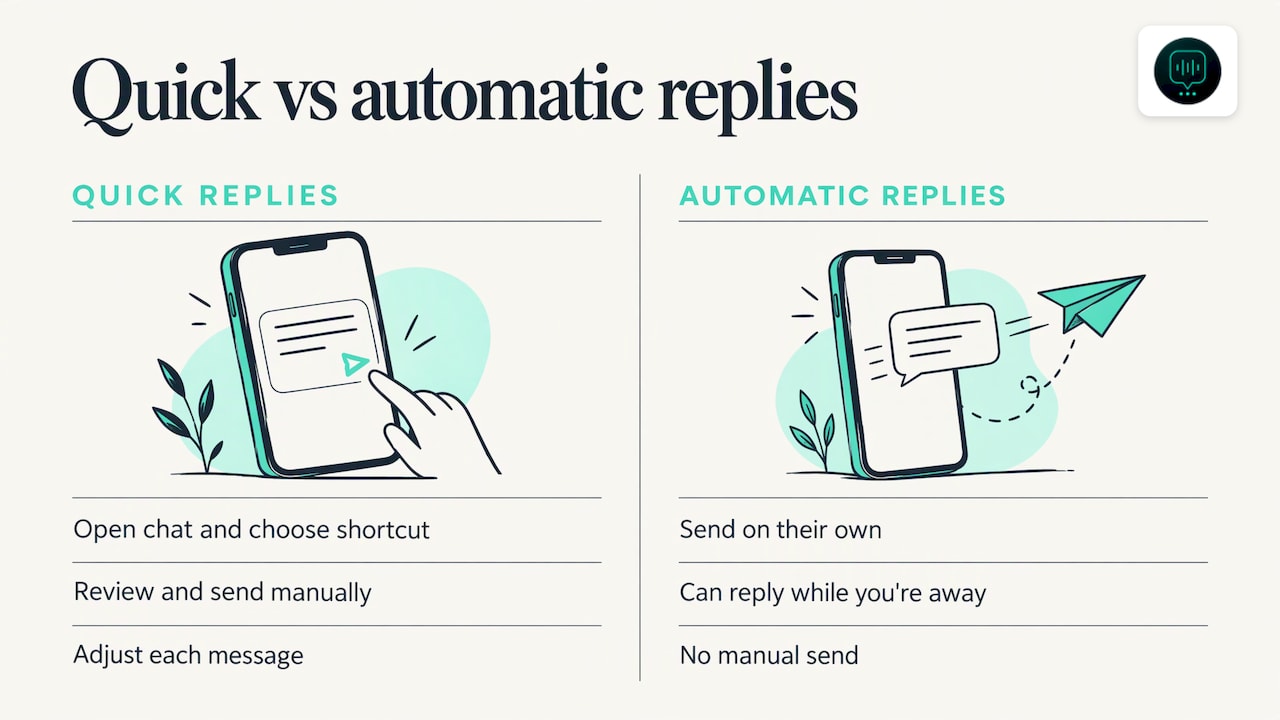
That difference matters for a trades business. Quick replies keep your voice and let you adjust each message, but they depend on you being at your phone. A roofer in Ealing on a pitched roof at 11am cannot type “/quote”. The customer waits, and the next roofer on their list may not.
What makes a good quick reply for a trades business?
The best ones read like you wrote them a minute ago. Four rules:
- Use the name. Start every message with the customer’s name. It takes two seconds and is the clearest sign a person is behind the message.
- Edit before sending. Add the street, the job or the day. Delete any line that does not fit this customer.
- Ask one thing at a time. Two questions at most. Customers answer short messages.
- Keep it short. Most replies below fit on a phone screen without scrolling.
The square brackets show what to change. Replace every bracket before you press send.
Which quick replies work for a first reply?
The first reply decides whether the customer keeps talking to you or moves on to the next number. Acknowledge the enquiry, then ask for what you need to price or book the job.
| Shortcut | Message |
|---|---|
| hi | Hi [Name], thanks for getting in touch with [Business]. I’ve got your message about [job]. Let me have a look and come straight back to you. |
| quote | Hi [Name], happy to help with a quote. Could you tell me what the job is, the postcode, and when you’d like it done? |
| area | Hi [Name], yes, we cover [area] and the surrounding boroughs. Can you send me the postcode so I can confirm for your address? |
A removals firm in Croydon might edit “quote” to ask for the moving date, both postcodes and the number of bedrooms. A drainage firm in Walthamstow might ask whether water is backing up now, because that changes the order of the day.
What do I say when someone asks the price?
Price questions arrive early and often before you have the details. Do not dodge them and do not guess. Give a route to a real number.
| Shortcut | Message |
|---|---|
| ballpark | Hi [Name], I can’t give a fair price without a few details. Send me [photos / the postcode and the size of the job] and I’ll come back to you with a figure. |
| survey | Hi [Name], for a job like this I’d rather see it than guess. I can pop round for a quick look on [day]. Would [time] suit? |
| quotesent | Hi [Name], I’ve sent your quote for [job]. It covers [what’s included]. Have a read and let me know if you’d like anything changed. |
| chase | Hi [Name], just checking you got the quote for [job]. Happy to talk it through or adjust it if that helps. |
Never type a price from memory into a shortcut. Prices change, and a stale number in a saved reply is how you end up honouring a quote you did not mean to give. Use a bracket and fill it in each time.
How do I ask customers for photos?
Photos save a wasted visit and let you quote faster. Customers often do not know what you need, so tell them exactly.
| Shortcut | Message |
|---|---|
| photos | Hi [Name], could you send two or three photos of [the problem area], one close up and one from further back? That’ll let me quote properly. |
| video | Hi [Name], a short video would help here. Could you film [the leak / the damp patch / the loft access] for ten seconds or so and send it over? |
| inventory | Hi [Name], to quote your move, could you send a photo of each room, plus anything large like wardrobes, sofas or a piano? |
| gotphotos | Thanks [Name], got them. I’ll look now and come back to you by [time]. |
If you attach a sample photo to a quick reply (for instance, a picture showing the angle you want of a roof), remember it only works from your phone, not from WhatsApp Web or Desktop.
If customers send photos out of hours, you can read about how a team can handle one number in our piece on a WhatsApp shared inbox.
What should I send to confirm a booking?
A clear booking message cuts no-shows and the “where do I park” phone call.
| Shortcut | Message |
|---|---|
| book | Hi [Name], I can do [day] at [time]. Shall I put you in the diary? |
| confirm | Hi [Name], you’re booked for [day], [time] at [address]. I’ll message when I’m on my way. If anything changes, just reply here. |
| access | Hi [Name], to save time on the day, can you let me know about parking, access to [loft / drain / property] and whether someone will be home? |
A cleaning firm might add the door code question and whether pets are in. A removals firm in Croydon would add lift access and any parking restrictions at both ends.
What do I send when I’m running late?
Customers forgive lateness far more readily than silence. Send these the moment you know, not when you arrive. Do not promise an arrival time you cannot control.
| Shortcut | Message |
|---|---|
| late | Hi [Name], sorry, I’m running late from the previous job. I’ll update you again once I’m on my way. |
| delay | Hi [Name], the job before this one has overrun. I’d rather not rush it. Would you like to keep today or move to [alternative]? |
| parts | Hi [Name], I need to collect a part for [job]. I’ll message as soon as I know when I can finish. |
Giving the customer the choice in “delay” is deliberate. It puts them back in control and often turns a complaint into a quick yes.
What do I send after the job?
The follow-up is where repeat work and reviews come from.
| Shortcut | Message |
|---|---|
| thanks | Hi [Name], thanks for having us today. If anything doesn’t look right once you’ve settled back in, message me here. |
| review | Hi [Name], if you were happy with the work, a short Google review would really help a small firm like ours. Here’s the link: [link]. Thank you. |
| invoice | Hi [Name], your invoice for [job] is attached. Payment details are on it. Let me know if you have any questions. |
When an invoice goes unpaid, the tone of your messages matters. Some firms use a set of UK payment excuse scripts to keep chasing calm and consistent. Keep your own “invoice” reply friendly and factual, and leave the firmer wording for later messages.
When do typed shortcuts stop scaling?
Quick replies work well when you answer a handful of enquiries a day and you are near your phone. They start to creak when:
- enquiries land while you are on a roof, under a sink or driving a van;
- messages arrive in the evening and at weekends, when you want to be off;
- you are copying the same questions (job type, postcode, urgency) into every chat;
- more than one person answers the same number and replies drift in tone.
In those cases the first reply is the part to hand over. Our WhatsApp Agent answers WhatsApp messages for the business, is trained on your services, coverage area and FAQs, and asks the same questions you would: job type, postcode and urgency. It routes urgent jobs to you, books into your calendar and passes your team a summary with the full context, then follows up with the customer on WhatsApp. It is natural-sounding and always says it is AI if asked.
Your quick replies do not go to waste. The wording you have refined above is exactly the material an agent is trained on. You keep the personal replies for the moments that need you, such as site visits and awkward conversations.
What we think
Monty Gordon, founder of DeskAgent, on why the first reply matters most:
A quick reply is a good tool for a one-person firm. We use that logic when we build DeskAgent: the customer should get a clear, friendly answer, asking the right questions, without the owner stopping what they are doing.
We built DeskAgent as four agents (Phone, WhatsApp, Web and Inbox) sharing one brain, plus DeskAgent HQ so you can run everything from one WhatsApp chat. Each agent is set up for you and trained on your services, postcodes and urgency rules. Ask HQ for today’s leads or a summary and you get them in the chat.
Our view is simple: keep your own voice for the jobs that need it, and let an agent take the first reply when you cannot.
Monty Gordon, founder of DeskAgent
What does it cost to put an agent on WhatsApp?
DeskAgent® is priced per agent, with no contracts and you can cancel any time. The WhatsApp Agent is £125 a month. Single agents have no setup fee, because the first month covers the build.
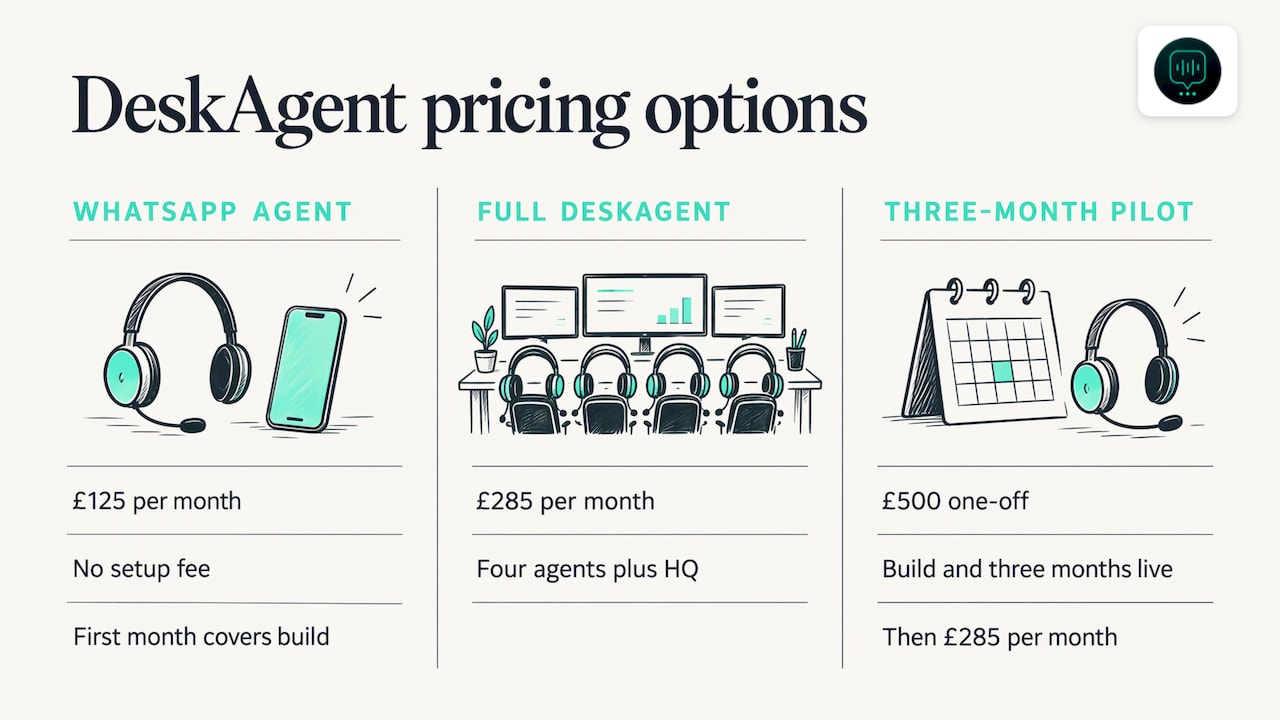
If you want all four agents plus DeskAgent HQ, Full DeskAgent is £285 a month. There is also a 3-month pilot for Full DeskAgent: a one-off £500 that covers the build and three months live, then £285 a month. Full details are on the DeskAgent pricing page.
The quickest way to see it is to book a free 30-minute demo. It is a 30-minute call where we show you an agent built for your business, whether that is a Croydon removals firm or a drainage team working across south London.
If you want to compare channels before deciding, our guide to automated lead follow-up covers what happens after the first reply.
How do I make my WhatsApp replies faster?
Speed comes from a few simple habits, whether or not you use an agent:
- Save the five replies you type most. Start with hi, quote, photos, confirm and late.
- Set your hours in your business profile so customers know when to expect an answer.
- Reply to the first message within the working day at least, even if it is only to say you have seen it.
- Check your list every month. Delete replies you never use and rewrite any that no longer sound like you.
- Test the shortcuts on your own phone before you rely on them, so that “/quote” opens exactly what you expect.
If you have two or three people answering the same number, agree one tone of voice and one set of shortcuts, then look at whether a shared inbox fits.
FAQ
How many quick replies can I save in WhatsApp Business?
The WhatsApp Help Center says you can store up to 50 quick replies. That is plenty for most trades: the 20 above plus a few for your own services. Keep a copy outside the app, because a deleted reply cannot be recovered.
Can I use quick replies on WhatsApp Web on my office computer?
Yes, you can type “/” and use them there, but media files in quick replies are not supported on Web or Desktop. If a reply includes a photo or video, send it from your phone.
Do quick replies send automatically when a customer messages me?
No. You open the chat, pick the reply, edit it if you want and send it yourself. If you want a message to go out without you, that is an automatic reply, or an agent that answers for you. Our guide to WhatsApp auto reply explains the options.
Will customers know if an AI agent answers instead of me?
Our agents are natural-sounding and always say they are AI if a customer asks. They are set up for your business and trained on your services, coverage area and FAQs, so the answers match what you would say.
Is there a contract if I try a WhatsApp Agent?
No. There are no contracts and you can cancel any time. A single agent has no setup fee, as the first month covers the build.
Sources
- How to use quick replies, WhatsApp Help Center
- WhatsApp Business app features
- UK payment excuse scripts