WhatsApp Auto Reply: How to Set It Up for Your Business
You can set up a WhatsApp auto reply for free, but only in the WhatsApp Business app, not in standard WhatsApp. It gives you two automatic messages: a greeting message for new or returning customers, and an away message for when you are busy or closed. Both take about ten minutes to set up. Neither can decide what a customer actually needs, which matters if you run a trades, cleaning or property maintenance firm where one missed message can be a missed job.
This guide walks through both messages step by step, gives you wording you can adapt, and is honest about where fixed auto replies stop being enough.
TL;DR
- Auto replies need the WhatsApp Business app. Standard WhatsApp has no built-in away or greeting message.
- A greeting message goes out when a customer first messages you, and again after 14 days of silence in that chat. An away message goes out when you are busy, closed or away from your phone.
- Good wording sets expectations: when you will reply, what to send you, and what to do if it is an emergency. It never promises attendance times or confirms a booking.
- Fixed replies and quick replies acknowledge a message. They do not judge urgency, check the postcode or book the job.
- If enquiries arrive faster than your team can read them, an AI front desk that qualifies and books is the next step.
Table of Contents
- What a WhatsApp auto reply can and cannot do
- Before you start: get the right app
- How to set up a greeting message
- How to set up an away message
- Example wording for trades
- Example wording for cleaners and property maintenance
- Quick replies: the manual cousin
- Where fixed auto replies fall short
- Our view: acknowledging is not answering
- When an AI agent does the job better
- DeskAgent plans
- A short checklist before you switch on any auto reply
- FAQ
- Sources
What a WhatsApp auto reply can and cannot do
People search for “auto reply” and mean several different things. In the WhatsApp Business app there are three tools, and the WhatsApp Business app features page groups them as ways to automate, sort and respond to messages more quickly:
- Greeting message: sent automatically when a customer messages you for the first time, or after a long gap.
- Away message: sent automatically when you are busy or outside your hours.
- Quick replies: saved snippets you trigger by hand, usually by typing a forward slash and a shortcut.
The first two are true auto replies: they fire without you touching anything. Quick replies are a typing shortcut. You still have to read the message, pick the right snippet and send it.
What none of them do is read the message. A customer writing “water coming through the ceiling” gets exactly the same greeting as one asking for a gutter quote next spring. That distinction shapes everything below.
One more point on terms. If you search for a WhatsApp autoresponder, you will find third-party apps that claim to reply on your personal account. Those work by reading your notifications, which is a different thing from the official tools. For a business, we would stay with the features built into WhatsApp Business, and graduate to a properly integrated system when you outgrow them.
Before you start: get the right app
Standard WhatsApp does not have away or greeting messages. You need the WhatsApp Business app, which is a separate download on both iPhone and Android.
A few practical decisions before you switch it on:
- Use a number that belongs to the business. If your van, your office and your mobile all share one number, decide who monitors it. Customers do not care who is on holiday.
- Complete your business profile. Add your trading name, services, coverage area and hours. Your auto reply should match what the profile says.
- Decide who owns the inbox. One named person checks it at set times. That is the difference between an auto reply that buys you time and one that merely hides a backlog.
If you are moving an existing customer chat number across, back up your chats first.
How to set up a greeting message
The WhatsApp Help Center explains greeting messages as a customisable message sent automatically when customers first message you. It is also sent when a customer messages after 14 days of inactivity in that chat.
The menu labels shift slightly between iPhone and Android and between app versions, so treat the path below as a guide.
- Open WhatsApp Business. On Android, tap the three-dot menu, then Business tools. On iPhone, open the Tools tab.
- Tap Greeting message.
- Switch on Send greeting message.
- Tap the message text to edit it, then confirm.
- Under Recipients, choose who receives it. You can usually send it to everyone, to people not in your address book, or to selected contacts.
- Save.
Test it by messaging your business number from a different phone. If you do not see the greeting, check that the person is not already in a recent conversation, because the message is designed for new or returning chats, not every single message.
What to put in a greeting
Keep it to four or five lines. A good greeting does three jobs:
- says who you are and thanks the customer for getting in touch;
- tells them what to send so you can quote or book without a back and forth;
- sets a realistic expectation of when a human will reply.
Anything longer gets skimmed.
How to set up an away message
The WhatsApp Help Center page on away messages describes it as a customisable message customers receive automatically when you are busy or away from your phone. You can choose which customers get it and when it is sent.
- Open WhatsApp Business and go to Business tools (Android) or the Tools tab (iPhone).
- Tap Away message.
- Switch on Send away message.
- Tap the message to edit it, then tap OK.
- Tap Schedule and choose when it sends. Typical options are always, outside business hours, or a custom time range.
- Choose the recipients, in the same way as for the greeting.
- Save.
Pick the schedule that matches how you work
| Schedule | Best for | Watch out for |
|---|---|---|
| Always | A short holiday or a week on one big job | Easy to forget to switch off |
| Outside business hours | Most small firms with set hours | Your hours in the app must be accurate |
| Custom time | Sole traders with split days, or weekend cover | Needs updating when your pattern changes |
There is a trap for firms that run an on-call service. If your away message says “we are closed” but you do take emergency callouts, customers with a real problem will assume nobody is coming. Write the message to reflect both realities.
Example wording for trades
Adapt these to your own services and hours. Replace anything in square brackets. Note what they leave out: no promised arrival times, no guaranteed quotes.
Greeting for a plumbing and heating firm
Hello, thanks for contacting [Business name]. To help us quote or book quickly, please send your postcode, a short description of the problem and a photo if you can. We will reply during working hours, Monday to Friday, 8am to 5.30pm.
Away message, out of hours
Thanks for your message. We are closed until [time/day] and will reply then. If you smell gas, call the National Gas Emergency Service on the number shown on your gas meter or your supplier’s website. For other emergencies, tell us here and we will pick it up as soon as we are back.
For gas safety wording, point people to the official route rather than improvising. The Gas Safe Register is where customers can check an engineer, if you want to link your registration in a profile or website instead.
Greeting for an electrician
Hi, you have reached [Business name]. Please tell us: your postcode, what you need doing, and whether it is a home or business property. We will come back to you within working hours.
Notice the structure: ask for the things you need to price the job, and ask for nothing sensitive. Do not request payment card details, passwords or anything you would not want sitting in a chat log.
Example wording for cleaners and property maintenance
Cleaning firms usually get a different kind of enquiry: lots of them, mostly routine, and from people comparing a few companies. Speed matters because the first firm to reply often gets the booking.
Greeting for a domestic or end of tenancy cleaner
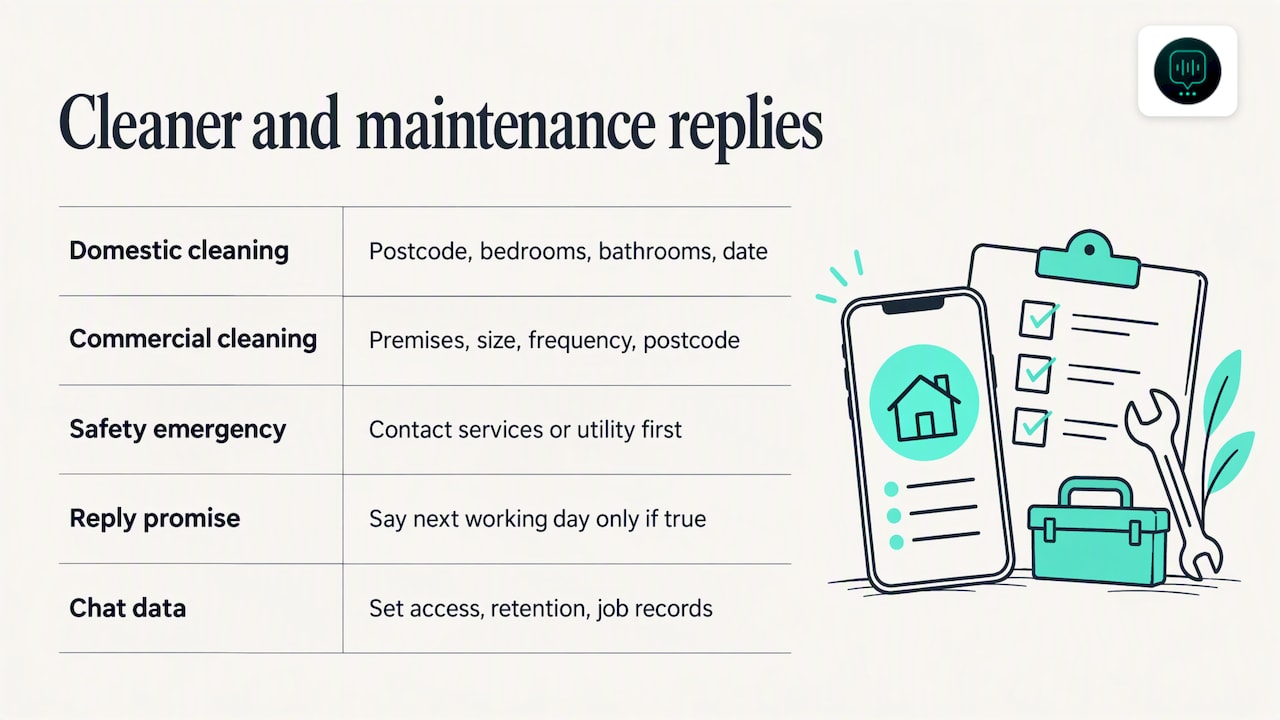
Hello, thanks for getting in touch with [Business name]. So we can give you an accurate price, please tell us your postcode, the number of bedrooms and bathrooms, and the date you need us. We reply to messages between 8am and 6pm.
Greeting for a commercial cleaning firm
Thanks for contacting [Business name]. Please let us know the type of premises, approximate size, how often you need cleaning and your postcode. A member of the team will reply on the next working day at the latest.
Only write “next working day” if your team really does reply that fast. A promise you break is worse than a vaguer one you keep.
Away message for a property maintenance company
Thank you for your message. Our office is closed and will reopen at [time]. If this is an emergency affecting safety, such as a fire, a gas leak or flooding near electrics, contact the emergency services or the relevant utility first. Then message us with the property address and we will follow up.
This follows the point that a fixed auto reply should not imply emergency attendance, a guaranteed response time or a confirmed booking. The wording directs real emergencies to the right place and leaves your firm out of promises it cannot keep at 2am.
A word on data. When you ask customers for addresses, photos or tenant details, you are handling personal information. The ICO has raised concerns that when staff use informal messaging apps, information can become hard to secure, retrieve and manage without a defined process. That ICO call concerned government use, but the lesson carries over: decide who has access to the business number, how long you keep chats, and where jobs are recorded once they are agreed.
Quick replies: the manual cousin
Quick replies sit alongside greeting and away messages in the Business tools menu. You save a snippet, give it a shortcut, and insert it by typing a forward slash in a chat.
They suit repeatable facts: your service area, your opening hours, what to prepare before an engineer arrives, or what information you need for a quote. The time saved is real. But they are shortcuts, not automation. Someone still has to read the incoming message and choose the reply, so they do not remove the risk of a message being missed overnight or while everyone is on a roof.
A sensible setup for a small firm is:
- A greeting message that asks for the basics.
- An away message that covers closed hours and emergencies.
- Five to ten quick replies for the questions you answer every week.
That covers a lot of ground for a one-van or two-van business.
Where fixed auto replies fall short
Somewhere between ten and fifty enquiries a week, the gaps start to show.
- No sense of urgency. A burst pipe and a request for a spring quote get the same reply. Your team still reads everything in order.
- No qualification. The reply cannot tell whether the customer is in your area, wants a service you offer, or has a realistic budget.
- One channel only. Customers also ring, fill in web forms and email. A WhatsApp reply does nothing for the missed call at 6.45pm.
- No booking. The auto reply asks the customer to wait. The customer, meanwhile, messages the next firm on the list.
- No context. When a person takes over, they have to scroll back through the chat and work out what was asked.
- Same text for everyone. The greeting repeats, even to your best repeat customer, unless you carefully exclude them from recipients.
None of this makes the built-in tools bad. They are a good free start. They simply acknowledge, and acknowledgement is not the same as response.
If you want a sense of how much slow replies can cost, take care with the numbers you find online. Many viral figures come from vendor surveys with unclear samples, and we would not build a business case on them. A more reliable approach is to count your own missed enquiries for two weeks and see what they would have been worth.
Something else worth tracking is what happens after the job. Many small firms are quick to win work and slow to chase payment, and a WhatsApp thread is a poor record when an invoice goes unpaid. If that sounds familiar, this guide on chasing unpaid invoices before it turns legal covers a sensible sequence using Xero or QuickBooks.
Our view: acknowledging is not answering
We built DeskAgent for UK service businesses, so we hear the same story from trades, cleaning and maintenance firms. The owner is on a job, the phone rings, a WhatsApp arrives, a web form lands in the inbox, and by the time anyone looks, the customer has booked someone else.
An auto reply helps with the first second of that problem. It tells the customer you exist. What it does not do is the work that follows: understanding what the customer wants, how urgent it is, whether it is a job you take, and getting it into the diary.
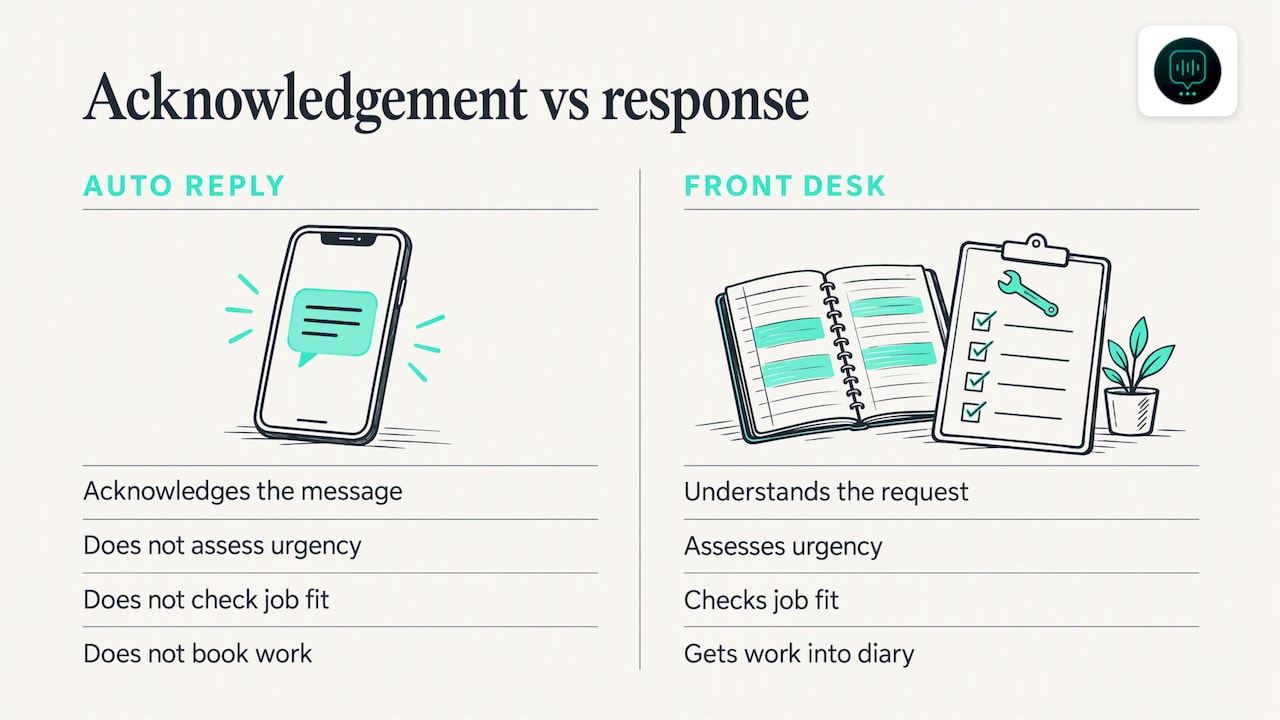
Our approach is to treat every channel as one front desk. The agent answers calls, WhatsApp messages and web enquiries around the clock, works out intent and urgency, and passes your team a clear summary with the conversation context intact so nobody has to ask the customer to repeat themselves. It is trained on your own services, coverage and FAQs, so it answers like your firm, not like a generic bot.
Our advice is plain: start with the free WhatsApp Business tools, write them well, and measure how many enquiries still slip through. If the answer is “a few a month”, you may not need anything more. If it is “several a week”, the problem is no longer wording.
— Monty Gordon
When an AI agent does the job better
An AI front desk makes sense when any of these are true:
- You miss calls because everyone is on site, and voicemail rarely gets returned.
- Enquiries arrive across phone, WhatsApp, email and your website, and nobody sees them all in one place.
- Urgent jobs get buried among routine ones.
- You spend evenings answering the same questions and chasing quotes.
- You want bookings made at the moment of interest, not the next morning.
Here is how that compares with the built-in tools:
| Greeting and away messages | Quick replies | AI front desk | |
|---|---|---|---|
| Replies without you | Yes, fixed text | No, you send | Yes, conversational |
| Understands the request | No | No | Yes, intent and urgency |
| Covers calls and web enquiries | No | No | Yes |
| Books into a calendar | No | No | Yes |
| Summary for your team | No | No | Yes |
DeskAgent plans
You do not have to automate everything at once. DeskAgent plans are priced per channel, so you can begin where you lose the most work:
- WhatsApp Agent: £125 per month
- Phone Agent: £125 per month
- Web Agent: £85 per month
- Inbox Agent: £85 per month
- The full DeskAgent system: £285 per month, with a one-off full setup fee of £500
The full system handles calls, WhatsApp, web enquiries and email together, with lead qualification, calendar booking, handoff with context, spam filtering for email enquiries and automated follow-ups. You can see the details on the DeskAgent site. Results depend on your business and how enquiries come in, so we do not promise a particular uplift.
A short checklist before you switch on any auto reply
- Does the message say when a human will reply, using a time you can keep?
- Does it tell customers what to send you?
- Does it direct emergencies to the proper service, rather than implying you will attend?
- Does it avoid asking for sensitive details?
- Do your business hours in the app match reality?
- Has someone tested it from a different phone?
- Has someone been named to check the inbox at set times?
- Do you review the wording each season, and whenever your hours or services change?
FAQ
Can you set an auto reply on standard WhatsApp?
No. The away and greeting messages are part of the WhatsApp Business app. Third-party apps claim to reply on a personal account, but they are not official features, so we would not rely on them for customer enquiries.
What is the difference between a greeting message and an away message?
A greeting message is sent when a customer messages you for the first time, or after 14 days of inactivity in that chat. An away message is sent when you are busy or outside your set hours, according to the schedule and recipients you choose. Many firms use both: the greeting to ask for details, the away message to set expectations about timing.
Are quick replies the same as auto replies?
No. A quick reply is a saved snippet you insert yourself by typing a forward slash and a shortcut. It saves typing, but someone still has to read the message and send it, so it does not cover messages that arrive when nobody is looking.
Can a WhatsApp auto reply book a job or judge urgency?
Not with the built-in tools. They send fixed text and do not read the customer’s message. For qualification, urgency and calendar booking, you need a system that understands the conversation, such as an AI front desk.
What should I avoid putting in an auto reply?
Avoid promising arrival times, guaranteed response times or confirmed bookings. Do not ask customers for card details or other sensitive information in the chat. For safety issues such as gas leaks, point people to the emergency services or the relevant utility rather than to your office.