AI Receptionist Pricing UK: What Service Firms Actually Pay

DeskAgent’s published starting price is from £85 a month. Whether AI or a human is cheaper in your business depends on the hours and cover required, as well as the full employer costs.
TL;DR:
- DeskAgent lists Phone Agent and WhatsApp Agent from £125 monthly, the full system from £285 monthly, with setup costing £500 once.
- Compare flat, per minute, per call, and hybrid billing against a busy month, then check allowance limits, overage rates, and partial minute rounding.
- For human cover, compare full employer cost, not wages alone: the April 2026 minimum for workers aged 21 and over is £12.71 before payroll costs.
- Run a pilot across quiet and busy periods, tracking booked jobs and handoff quality rather than answered calls alone, before committing to a longer contract.
Table of Contents
- What do AI receptionist pricing tiers look like?
- How do flat monthly, per-minute and per-call pricing work?
- What pushes the price up?
- What’s included at typical price points?
- How does an AI receptionist compare with hiring a human?
- What hidden costs and contract details should you check?
- How do you choose and what should you ask vendors?
- What contract lengths and commitment periods are typical?
- How do business size and call volume affect your options?
- How does pricing scale as your business grows?
- Which option is more cost-effective for typical service business scenarios?
- Our view: judge it by booked jobs, not answered calls
- What does our DeskAgent plan include and cost?
- FAQ
- Sources
What do AI receptionist pricing tiers look like?
Most AI receptionist pricing falls into three bands, and the right one depends on how many enquiries you handle and how much you need the system to do for you. Knowing which band you sit in stops you paying for capacity you will never use.
- Entry-level tiers: Check whether a plan covers the channels and usage your business needs. It may suit a sole trader or a small cleaning firm looking for additional enquiry cover.
- Mid-range packages: Compare the included usage, call capacity and any calendar or job-software links. These may suit a trades firm or property maintenance team handling enquiries across more than one channel.
- Premium or enterprise tiers: Check whether the plan includes dedicated capacity, bespoke training or priority support, and whether those options suit your business.
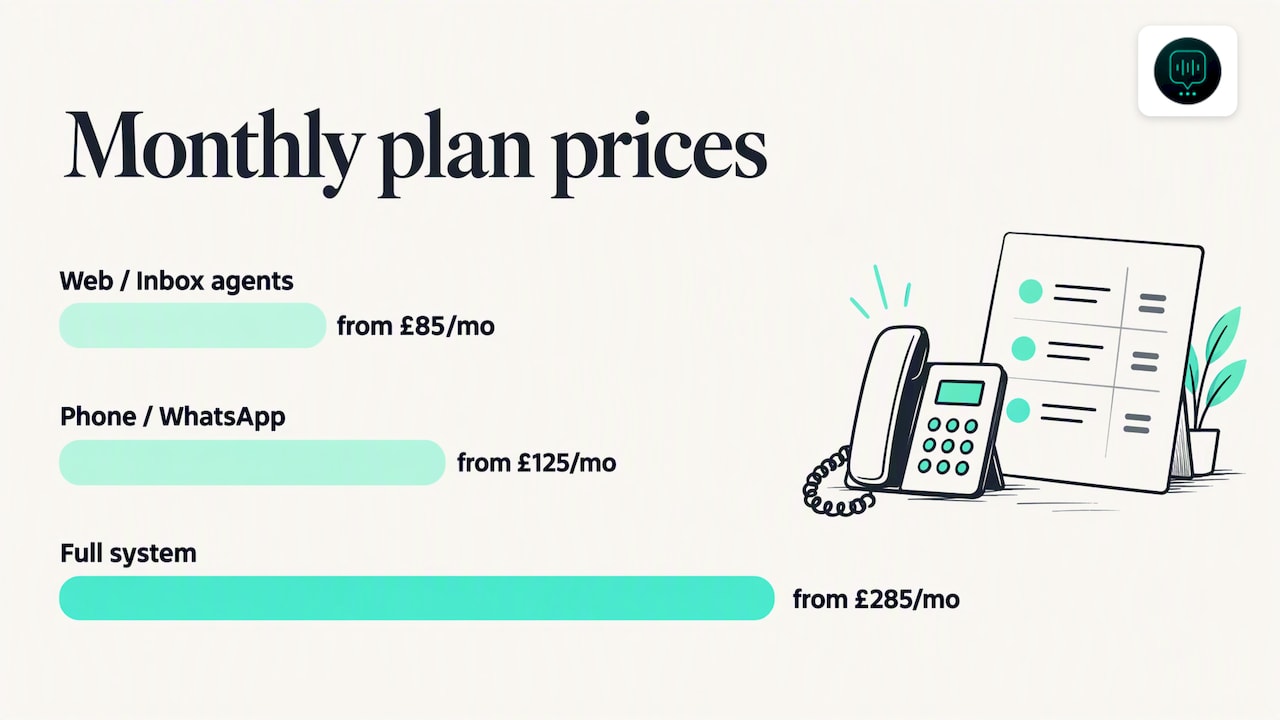
As an in-market data point, we list our Web Agent and Inbox Agent from £85 a month, with our Phone Agent and WhatsApp Agent from £125 a month and the full system from £285 a month, all on Deskagent. Each plan covers a different channel or combination of channels, so you can start with the one that matches where your enquiries actually arrive.
When you compare quotes, match tiers by what they include rather than by name. One provider’s “starter” plan can carry the same allowance as another’s “professional” plan.
How do flat monthly, per-minute and per-call pricing work?
Billing mechanics decide whether your bill stays predictable or swings with the seasons. There are four common structures, and each pays off in a different situation.
- Flat monthly rate: You pay one fee for a defined bundle of channels and usage. This is the easiest to budget for and works well when your call volume is steady.
- Per-minute billing: You pay for the minutes the AI spends on calls. It suits a business with few, short calls, but a handful of long, detailed enquiries can push the bill up quickly.
- Per-call billing: You pay a set amount for each call answered, regardless of length. For an illustrative example, multiply your monthly call count by the quoted per-call rate. Check whether the charge changes with call length. The figures are illustrative only.
- Hybrid models: A flat fee covers a baseline, with extra usage billed on top or topped up through booster packs. This helps when a cold snap or a storm season sends emergency enquiries through the roof for a few weeks.
Pro Tip: Estimate your monthly cost by multiplying your average monthly calls by your average call length in minutes, then price that total under each model. Add a buffer for your busiest month, not your average one.
Overage is where unexpected charges tend to appear, so check what happens when you exceed your allowance before you sign anything.
What pushes the price up?
A few features and usage patterns account for most of the difference between a cheap plan and an expensive one. Deciding which are must-haves keeps the monthly figure under control.
- Call volume and concurrency: More included minutes and the ability to take several calls at the same time cost more than a small allowance with one line.
- Channels covered: Phone, WhatsApp, web chat and email each add capability. A single-channel plan is cheaper than one that captures enquiries everywhere.
- Integrations and custom workflows: Calendar links, CRM connections and bespoke call flows take configuration effort, and some providers charge for it separately.
- Training on your business: A system trained on your specific services, coverage area and common questions usually costs more than a generic script, but it answers more accurately.
- Analytics, transcripts and storage: Longer retention, richer reporting and export options can sit behind higher tiers.
If you run your office tools on a cloud suite, check that any calendar or mailbox integration works with it. For teams on Google Workspace, calendar booking is usually the integration that saves the most admin time.
What’s included at typical price points?
When quotes arrive, the headline price tells you little until you know what sits behind it. Use this checklist to compare like with like.
- Usage allowance: Is it stated as minutes, calls or conversations, and how is a call that ends early counted?
- Concurrency: Does the plan say how many calls can run at once, or is that left vague?
- Onboarding and support: Find out what setup help comes with the plan and what is treated as chargeable custom work.
- Qualification and booking: Some plans qualify leads by urgency and intent, book into your calendar and pass the conversation to your team with its context intact. Others only take a message.
- Records and reporting: Check whether you get recordings, transcripts and summaries, and for how long they are kept.
A plan that includes lead qualification and a clean handoff saves your team from re-asking the customer the same questions. That is worth weighing against a cheaper plan that only collects a name and number.
How does an AI receptionist compare with hiring a human?
The honest comparison is not the AI fee against a salary. It is the AI fee against the full employer cost of the hours you would need covered.
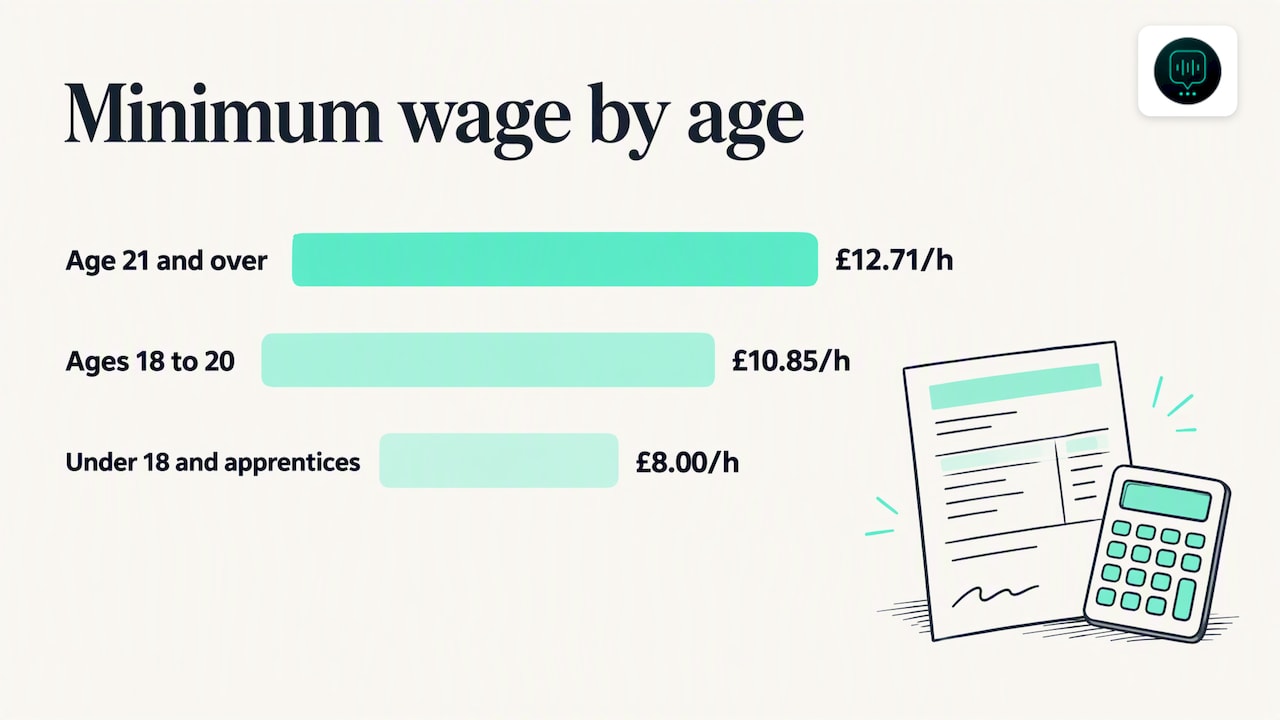
Start with the wage floor. The current National Minimum Wage and National Living Wage rates show that from April 2026 the rate for workers aged 21 and over is £12.71 an hour, £10.85 for ages 18 to 20 and £8.00 for under 18s and apprentices. That is the minimum before anything else is added.
On top of wages, employers pay employer National Insurance. GOV.UK’s contribution tables show employers pay 15% on earnings above the secondary threshold for many categories in 2026 to 2027, and the employer rates and thresholds page gives the Class 1A rate on expenses and benefits as 15%. Pension contributions, holiday pay and sick pay come on top of that.
The National Living Wage for those aged 21 and over is £12.71 an hour from April 2026, and that figure is only the starting point before employer on-costs. (GOV.UK)
To build your own comparison, work through it in plain steps:
- Part-time cover: Multiply the hourly rate by the hours you need each month, then add employer National Insurance, pension and holiday pay on top.
- Full-time cover: Do the same for a full working week, then add recruitment, training and the cost of covering absences.
- The AI alternative: Take the monthly plan price and add any setup fee and expected overage.
The qualitative differences matter as much as the arithmetic. A person brings judgement, can calm an upset customer and can handle an unusual situation. An AI front desk may provide cover outside an employee’s working hours, depending on the service and plan. Check what response times and lead-qualification features are included. Many firms use the AI for first contact and keep staff for escalation.
What hidden costs and contract details should you check?
The advertised monthly fee is rarely the whole story. Look for these before you commit.
- Setup and integration charges: Some providers charge a one-off fee to configure the system. Our own full system setup is listed at a one-off £500 on Deskagent, and you should ask any provider for the equivalent figure.
- Overage calculation: Find out how extra usage is charged and whether partial minutes are rounded up.
- Support and exit terms: Check which support level is included, what the service commitments exclude and whether cancelling costs anything.
- Data extras: Longer retention, transcripts and export formats can be billed separately.
Ask for every charge to be written into the quote, so the figure you approve is the figure you pay.
How do you choose and what should you ask vendors?
A short, structured process makes quotes comparable and exposes gaps early.
- Write down your numbers: Estimate monthly calls, the channels customers use, the integrations you need and how many calls can arrive at once.
- Ask the billing questions: How are minutes counted, what happens above the allowance and is there a cap on overage?
- Ask the capacity questions: How many simultaneous calls are supported and what happens when that limit is reached?
- Ask the cost questions: What is charged for setup, custom work and extra support, and what is the cancellation process?
- Run a short pilot: Track answered calls, booked jobs and the quality of handoffs to your team, not just how many calls were picked up.
A pilot of a few weeks, covering both a quiet and a busy stretch, tells you far more than a demo.
What contract lengths and commitment periods are typical?
Contract terms vary widely in this market, so treat commitment as something to negotiate rather than accept. Some plans run month to month and can be cancelled with short notice. Others may offer a discount in return for a longer commitment, which could lower the monthly price but lock you in.
For a service business, flexibility usually beats a small saving. Your call volume changes with the seasons, and the system you need in the first month may not be the one you need after a busy summer. A rolling plan lets you move up or down as your workload shifts, and it limits the damage if the service turns out to be a poor fit.
Before signing, ask four things. How much notice is needed to cancel, and does it take effect at the end of the billing period? Can you move to a different plan mid-term without a penalty? Does a longer commitment lock in the price, or can the provider raise it? And is there a trial or demo period before billing starts? If a provider will not put the answers in writing, treat that as a warning sign.
If you are unsure, start on the shortest term available, measure results for a few weeks and only then consider a longer agreement.
How do business size and call volume affect your options?
Size changes which pricing model suits you. A sole trader taking a low volume of calls may have little use for a large allowance. Compare entry-level flat plans with other available billing options. Paying per call or per minute can also work at that scale, because low volume keeps the bill small.
A growing firm with engineers or cleaners on the road may face a different problem: calls can come when staff are busy, and a missed call may mean a lost job. Here a mid-range plan with higher concurrency and calendar booking tends to earn its keep, because the system can handle several enquiries at once while your team is on site.
Larger property maintenance and facilities businesses handle more volume across more channels. At that point per-minute billing can become unpredictable, while a flat or hybrid plan with a generous allowance gives you a stable figure to budget against.
The practical step is to count your calls for a typical month and a busy one, note how many arrive outside office hours, and note how many are urgent. Those three numbers tell you which pricing model and which tier fit your business, and they give you something concrete to take to a vendor.
How does pricing scale as your business grows?
Good pricing should move with you, not punish you for success. When your call volume rises, the question is whether your costs rise gently or jump sharply.
With a flat plan, growth is cheap until you pass your allowance, and then you either pay overage or move up a tier. Check where those thresholds sit and what the next tier costs, so a good month does not become an expensive surprise. With per-minute or per-call billing, costs rise in line with volume, which is fair but can become expensive during a very busy spell.
Seasonal firms should ask about booster options. A heating engineer in winter or a pest control business in summer may need extra capacity for a few weeks and not want to pay for it all year. Likewise, if you add a new channel such as WhatsApp or web chat, find out whether it is added to your current plan or billed as a separate product.
Scaling down matters too. If a busy period ends, can you reduce your plan without a penalty? A provider that lets you add and remove capacity easily protects you from paying for volume you no longer have. Ask how quickly changes take effect, and whether they apply from the next billing date or immediately.
Which option is more cost-effective for typical service business scenarios?
Rather than quoting invented figures, it is more useful to reason through three common situations and apply your own numbers.
The sole trader or small cleaning firm. You are out on jobs for most of the day and miss calls. Employing someone to answer would be far more than the work justifies, while an entry-level AI plan costs a fraction of even a part-time wage once employer National Insurance and pension are included. Cost-effectiveness is strongly in the AI’s favour.
The growing maintenance or trades business. You take a steady flow of calls, messages and web enquiries. A mid-range plan that qualifies leads and books jobs can cover evenings and weekends without extra payroll. The deciding factor is whether the booked-job uplift outweighs the monthly fee, which a pilot will show.
The larger facilities or multi-site firm. You may already employ coordinators. Here the AI front desk typically complements staff by handling first contact and routine enquiries, leaving people free for complex cases. The saving comes from reduced workload rather than removing roles.
In each case, set the monthly plan price, plus any setup fee, against the employer cost you would otherwise carry. Include the value of leads currently lost to unanswered calls, because that is often the largest figure on the page.
Our view: judge it by booked jobs, not answered calls
In our experience of how trades and service firms work, the calls that matter arrive when you cannot take them: first thing in the morning, mid-job and in the evening. Peak seasons make this worse, because the busiest weeks are exactly when nobody is free to pick up. That is the gap an AI front desk is built to close.
Check the product details to see which channels and features are included in the plan you are considering. We would still encourage you not to judge any provider, ours included, on answered-call counts alone. Answering every call is only valuable if it turns into booked work.
So run a pilot, record how many enquiries become jobs and compare that with what you were converting before. Results vary between businesses, and no provider can promise a particular uplift. Measuring your own numbers is the only reliable way to decide whether the monthly fee earns its place.
— Monty Gordon
What does our DeskAgent plan include and cost?
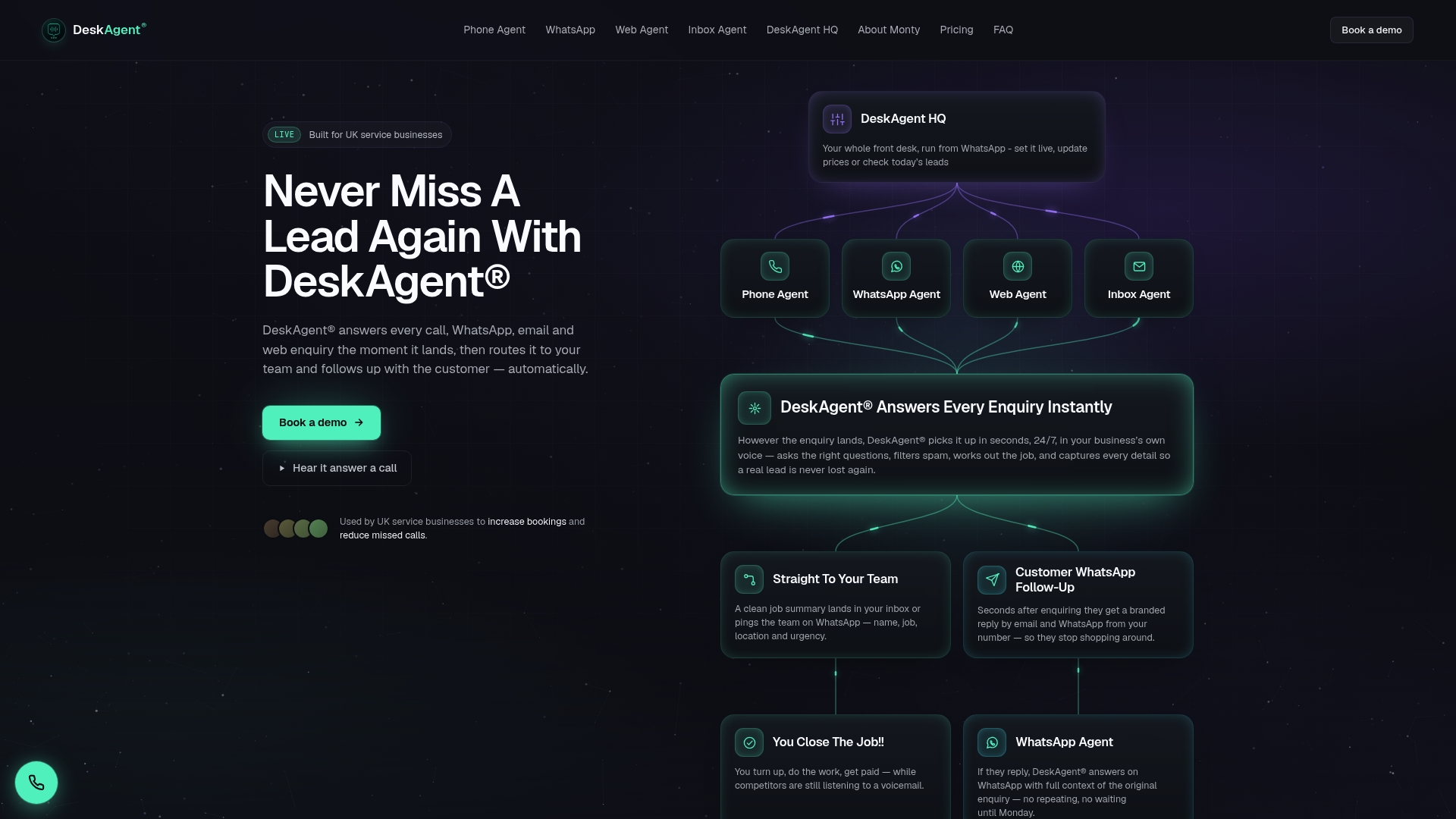
Our published pricing starts from £85 a month, as listed on Deskagent, so you can hold it up against the checklist above and the employer-cost steps earlier in this article. Check the product details for the channels and features included in each plan.
Compare each point with the quotes you collect, and check the plan details on our product page to see which channels and features match how your customers get in touch.
FAQ
Is an AI receptionist worth it for a small business?
It can be, particularly if you regularly miss calls while working on site. The test is whether the monthly fee is lower than the value of the jobs you currently lose and lower than the employer cost of covering the same hours with a person.
How much does an AI receptionist cost in the UK?
Prices depend on the billing model, channels and usage. Our own plans start from £85 a month, as listed on Deskagent, and other providers use flat, per-minute or per-call pricing, so compare what each quote includes.
Is an AI receptionist available in the UK?
Yes, AI receptionist and front desk services are available to UK businesses. We built ours specifically for UK service businesses such as maintenance, property management and trades firms.
Why does employer cost matter when comparing with a human receptionist?
A wage is only part of what you pay. Employer National Insurance, pension contributions and holiday pay all add to the total, as set out in GOV.UK’s employer rates.