AI Email Assistant: Auto-Reply to Enquiry Emails
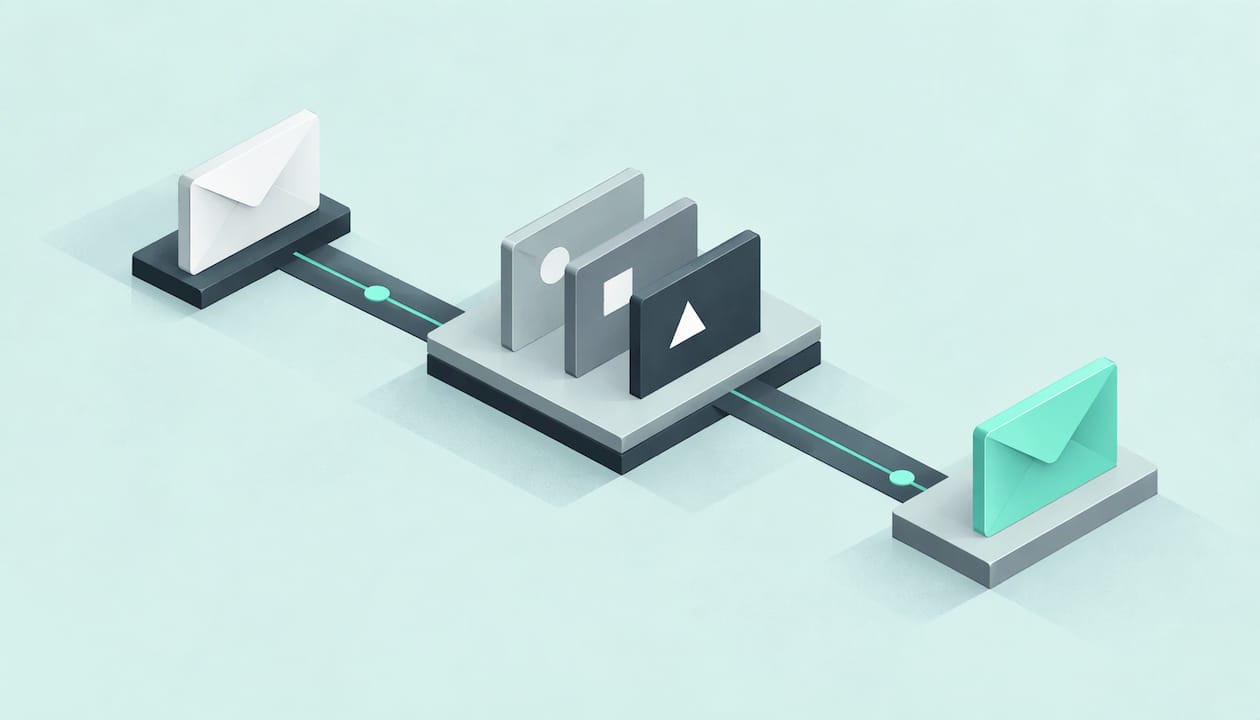
An AI email assistant reads each message that lands in your enquiry inbox, sorts it as a new lead, existing customer, supplier or spam, and replies to real leads with the questions you need answered. Set it up with clear triage rules and templates, and the big jobs reach you first.
TL;DR
- Sort every email into four buckets first: new lead, existing customer, supplier, spam. Only new leads get an auto-reply.
- Reply to a lead with questions, not a quote: job type, postcode, access, timing and photos.
- Use five templates: removals quote, cleaning quote, emergency, comparison-site lead and out of hours.
- Escalate to the owner for large jobs, emergencies, complaints, anything about money and first-time senders asking for unusual things.
- DeskAgent® has an Inbox Agent that does this for £85 a month, with no contract and no setup fee.
Table of Contents
- What does an AI email assistant do with enquiry emails?
- How should you sort your inbox: new lead, customer, supplier or spam?
- What should an enquiry auto-reply say?
- Which five auto-reply templates does a service business need?
- When should an AI assistant hand an email to the owner?
- How do you set up an AI email assistant for your enquiry inbox?
- Is it safe to let AI read customer emails under UK GDPR?
- What does an Inbox Agent cost, and what happens next?
- What do we think about AI email replies?
- FAQ
- Sources
What does an AI email assistant do with enquiry emails?
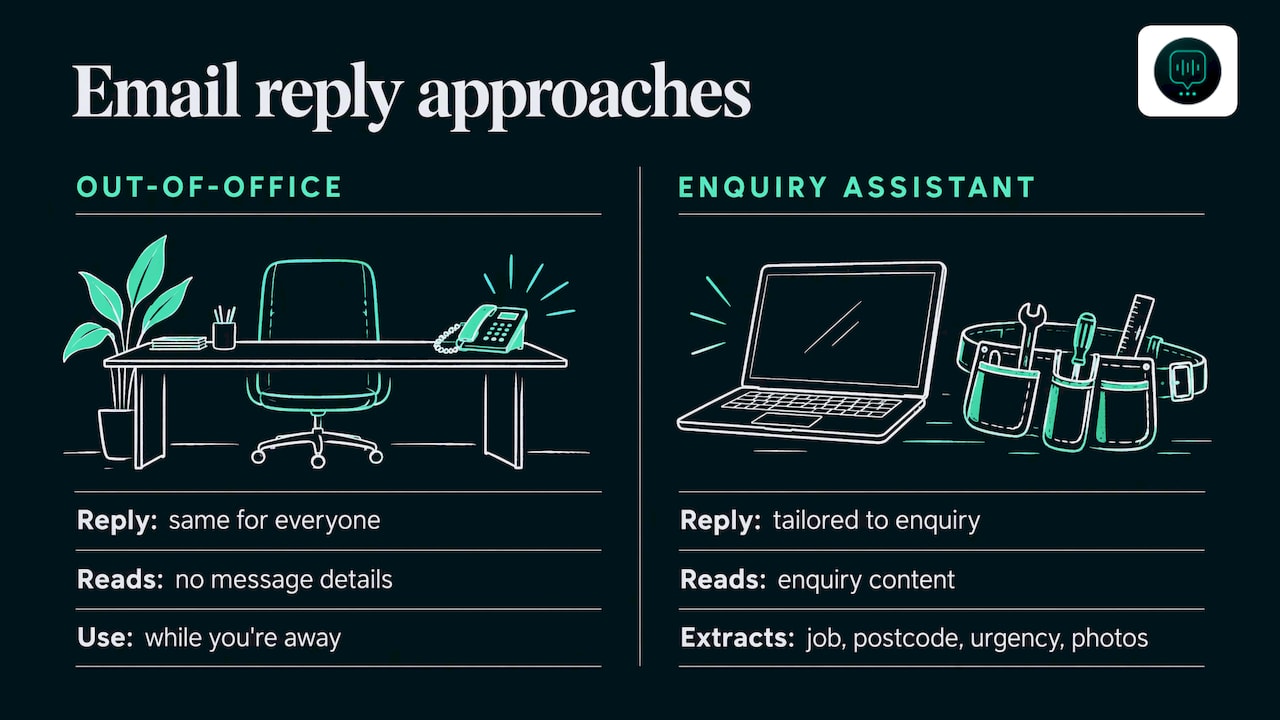
At its simplest, it does three jobs you currently do between jobs, on a van seat or at 9pm. It reads the email, decides what kind it is, and writes a reply. A good one also pulls out the details that matter to a trade: the type of job, the postcode, how urgent it is and whether the customer sent photos.
That is different from the spam filter and out-of-office reply you already have. Gmail’s out of office help shows how to set an automatic reply while you are away. That reply is the same for everyone and knows nothing about the message. An assistant built for enquiries reads what was said and answers it.
The reason to bother is speed. A roofer in Ealing who is up a ladder from 8am cannot answer a leak enquiry until lunch, and by then the customer has often emailed two other firms. Our post on why replying in minutes wins the job goes into that in more detail.
How should you sort your inbox: new lead, customer, supplier or spam?
Write your triage rules down before you switch anything on. An assistant is only as good as the rules it is given, and four buckets cover almost every message a service business receives.
1. New lead
Someone you have not dealt with before who wants a price, a visit or a booking. Signals: words such as quote, estimate, availability, price, can you come, a postcode, a job description, or a forward from a comparison site. Action: send a reply with questions, log the details and tell the owner or office.
2. Existing customer
Someone already on your books: a rebook, a question about a visit, a snag after a job, an invoice query. Action: do not send the new-lead template. Pass it to the person who knows the job, with a short summary. Complaints and anything about payment go straight to the owner.
3. Supplier
Merchants, subcontractors, insurers, software firms, accountants. Action: no auto-reply to quote requests. File it, and flag only the ones with a deadline, such as a delivery change for a job tomorrow.
4. Spam
Cold sales pitches, SEO offers, fake invoices, phishing. Action: filter it out and never reply. Replying to junk confirms that your address is live.
A rule for the awkward cases
Some emails fit two buckets: a landlord who is both an existing customer and asking for a new quote, say. Give the assistant a tie-break: if in doubt, treat it as an existing customer and pass it to a person. A wrong human check costs you a minute. A wrong template to a good customer costs more.
What should an enquiry auto-reply say?
The best auto-reply does one thing: it gets the customer to give you the facts you need to price the job. It does not quote. It does not promise a time you cannot keep. It sounds like your firm, in a couple of short paragraphs.
Every template below follows the same pattern:
- Thank them and name the job in their own words, so they know it was read.
- Ask three to five specific questions.
- Say what happens next, without a hard promise.
- Sign off with your firm name.
Square brackets are the bits the assistant fills in from the email or from your business details.
Which five auto-reply templates does a service business need?
Template 1: removals quote
A removals firm in Croydon gets a mix of one-bed flats and four-bed houses. The price depends on volume, access and dates, so the reply asks for exactly that.
Subject: Your move from [area] to [area]
Hi [name], thanks for getting in touch about your move to [destination]. To give you an accurate quote we need a few details:
- Collection and delivery postcodes
- Number of bedrooms and anything large (piano, wardrobes, garden furniture)
- Floor levels, lifts and parking at both ends
- Your preferred date, and whether it is flexible
- Whether you need packing or storage
Reply to this email with those and a member of the team will come back to you with the next step. [Firm name]
If your business is removals, our removals page sets out how an AI front desk fits that work.
Template 2: cleaning quote
Cleaning enquiries vary from a one-off end of tenancy clean to a weekly office contract. Ask which, early.
Subject: Your cleaning enquiry
Hi [name], thanks for your enquiry about [type of clean] at [postcode]. So we can price it properly, could you tell us:
- Property type and number of bedrooms, bathrooms or floor area
- One-off or regular, and how often
- Any extras: oven, windows, carpets, fridge
- Your preferred start date
- Whether access is by key, code or someone being in
Photos of any problem areas are useful. We will be in touch once we have your answers. [Firm name]
Template 3: emergency
Blocked drains, burst pipes, roof leaks, wasps in a nursery. The emergency reply is short, asks for what is needed to dispatch and tells the customer what to do while they wait.
Subject: We have your urgent request
Hi [name], we have received your message about [problem] at [postcode] and flagged it as urgent for the owner. Please reply with:
- The full address and a contact number you will answer
- What is happening right now (water running, no heating, access blocked)
- Whether anyone is at risk
If there is a danger to life or a gas smell, leave the property and call the emergency services or the gas emergency line straight away. [Firm name]
The safety line stays in every emergency template, whatever your trade. For a drainage firm, add a line to ask whether the blockage is inside or outside the property. For a burst pipe, ask whether the customer can reach the stopcock.
Template 4: comparison-site lead
Leads that arrive through a comparison site usually come in a fixed format, often with the customer also sent to other firms. The reply needs to be fast and personal, and it should move the conversation off the site if the site’s terms allow.
Subject: Re: your [trade] request via [site]
Hi [name], we have your request for [job summary] in [area]. We can look at this for you. To confirm availability and a price, could you let us know:
- The best day and time for a visit or call
- Anything the site form did not capture, such as access or parking
We will confirm the next step as soon as we have those. [Firm name]
Check the terms of any lead site before you contact customers outside it. Those rules are yours to know.
Template 5: out of hours
Enquiries arrive in the evening and at weekends, when the office is shut. Say so honestly and still collect the details.
Subject: Thanks for your enquiry
Hi [name], thanks for contacting [firm]. Our office is closed at the moment and we will pick this up on [next working day]. In the meantime, if you tell us [job type], [postcode] and when you would like us to come, we can have an answer ready for you.
If it is an emergency, please say so in your reply and we will flag it. [Firm name]
The rule on opening hours is yours. Put the real hours in the template and do not promise a reply time you may miss.
When should an AI assistant hand an email to the owner?
The point of the assistant is that you only see what needs you. Write your escalation list as plainly as your triage rules. These are sensible triggers for a trades or removals business:
- Big jobs. A whole-house move, a full roof strip, a commercial cleaning contract or a block-wide pest treatment. Set a threshold in job type or size, and let the owner price these.
- Emergencies. Anything marked urgent, or containing words such as flooding, leak, sewage, no heating or infestation.
- Complaints and damage. An unhappy customer needs a person, not a template.
- Anything involving money. Payment details, refunds, changed bank details, invoice disputes.
- First-time senders asking for something unusual. An unknown address asking you to open a link, send a document or change a payment is a red flag.
- Repeat or valuable customers. Letting agents, housing associations and facilities managers who send you regular work deserve a personal answer.
The last two reasons are about security as well as service. The UK’s National Cyber Security Centre has warned that prompt injection, where hidden instructions in an email try to steer an AI assistant, may never be fully mitigated. The practical answer is to limit what the assistant can do: have it read, sort, reply with questions and pass things to you, and keep payments and unusual requests with a person.
How do you set up an AI email assistant for your enquiry inbox?
Whether you build it yourself or have it done for you, the routine is the same.
- Pick one inbox. Start with the address on your website and your van, not every mailbox in the firm.
- Write your four buckets. Use the triage rules above, with a sentence or two of examples for each.
- Write your facts. Services you offer, areas you cover by postcode, rough opening hours, and common questions with the answers you give.
- Choose the templates. The five above cover most firms. Edit them into your own voice.
- Set the escalation list. Name who gets what: owner, office manager, surveyor.
- Read the first weeks of replies. Check that the right emails got the right template and that nothing sensitive was answered by mistake. Adjust the rules.
The weak spot is step 3. Most small firms have never written down which postcodes they will and will not cover or what makes a job urgent, so the assistant guesses. That is why we do the set-up for you with the Inbox Agent: it is trained on your services, coverage area and FAQs before it reads a single enquiry. You can see how it works on our page for an AI email assistant for business enquiries.
Is it safe to let AI read customer emails under UK GDPR?
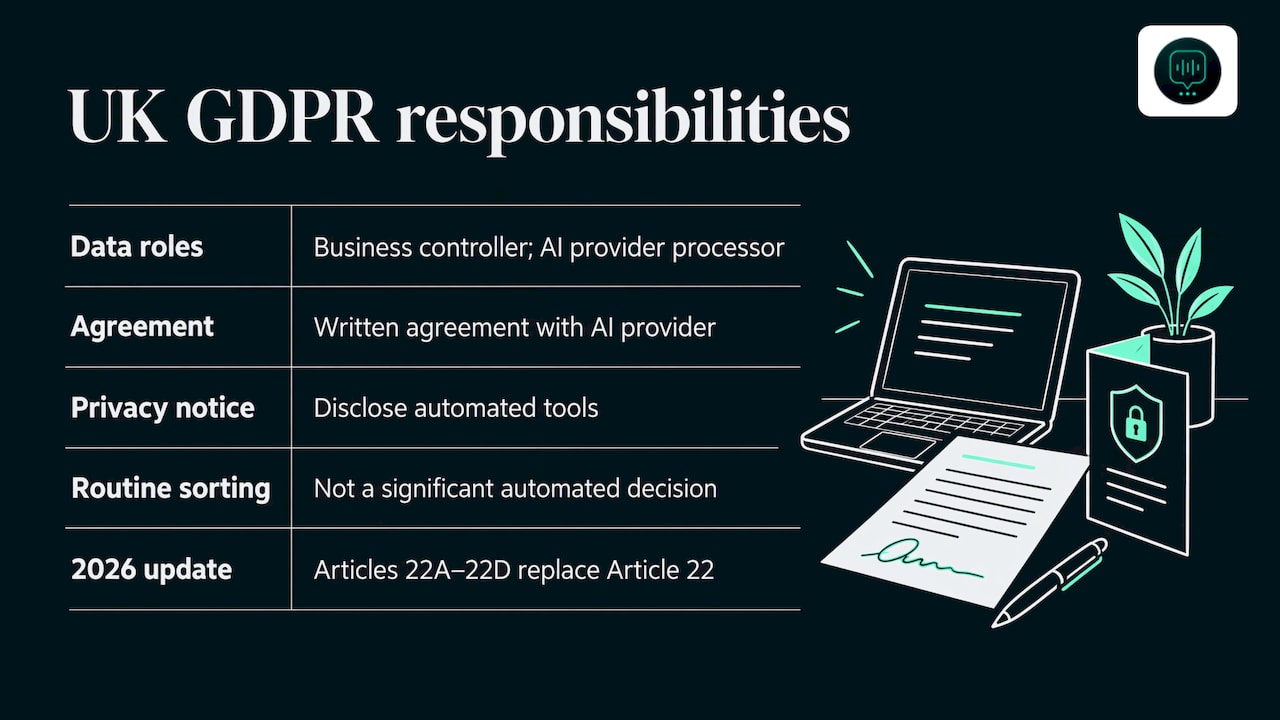
Yes, with the usual care. Customer emails contain names, addresses and sometimes photos of the inside of people’s homes, so they are personal data. Under UK data protection law, the business is normally the controller of that data and the AI provider its processor, which means you should have a written agreement with the provider and say in your privacy notice that you use automated tools. The point is made clearly in Bratby Law’s guide to automated decision-making, which also notes that accountability stays with the business that buys the software.
The same guide explains that the Data (Use and Access) Act 2025 replaced Article 22 of the UK GDPR with new Articles 22A to 22D from 5 February 2026. Those rules concern significant decisions made solely by automated means. Sorting an enquiry and asking a customer for their postcode is not that kind of decision, and quotes, complaints and money matters go to a person under the escalation list above.
If you want to go further, the Information Commissioner’s Office publishes guidance on AI and data protection for small organisations. Ask your own adviser if your inbox holds special categories of data, such as health details from a customer needing access adjustments.
What does an Inbox Agent cost, and what happens next?
DeskAgent has four agents, Phone, WhatsApp, Web and Inbox, plus DeskAgent HQ. For email, you need the Inbox Agent. It reads email enquiries, filters spam and replies. It qualifies each enquiry by job type, postcode and urgency, routes urgent jobs to the owner, books into the calendar and hands your team a summary with the full context. It then follows up with the customer on WhatsApp.
| Plan | Price |
|---|---|
| Inbox Agent | £85 a month |
| Web Agent | £85 a month |
| Phone Agent | £125 a month |
| WhatsApp Agent | £125 a month |
| Full DeskAgent (four agents plus DeskAgent HQ) | £285 a month |
Single agents have no setup fee: the first month covers the build. There are no contracts and you can cancel any time. The Full DeskAgent 3-month pilot is a one-off £500 that covers the build and three months live, then £285 a month. The full list is on our pricing page.
The free demo is a 30-minute call where we show an agent built for your business. You can book a free 30-minute demo and see it working on your own kind of enquiry, whether that is a Croydon removals quote or a drainage call-out.
DeskAgent HQ lets you run it all from one WhatsApp chat: update prices and FAQs, pause the agents, check today’s leads and ask for summaries when you want them. Our agents sound natural and always say they are AI if asked.
What do we think about AI email replies?
Most trades owners we talk to are not short of effort. They are short of hands at the moment the enquiry arrives. The email comes in while the roofer is on the roof, the removals manager is at a survey, the cleaner’s phone is in a locker.
We built the Inbox Agent around the idea that the first reply should do real work: ask the right questions, in your voice, and get the details to you in a form you can act on. Done well, the customer feels looked after and you start the day with a summary instead of forty unread messages.
The other half is control. You decide the rules, you decide what counts as urgent and you decide what comes to you. That is why we set each agent up for your firm and why we keep DeskAgent HQ in a WhatsApp chat you already use. If you want to see how fast replies fit into a wider routine, read our guide to automated lead follow-up.
When you are ready to see it on your own enquiries, book a free 30-minute demo and we will show you.
Monty Gordon, founder of DeskAgent
FAQ
Will customers know they are talking to an AI?
Our agents sound natural, and they always say they are AI if asked. You can also say in your email footer that replies are handled with an automated assistant. Being open about it is the simplest way to keep trust.
Can an AI email assistant quote a removals job?
It can ask the questions a quote depends on: postcodes, bedrooms, access, date and packing. Your team then prices from a clear summary. For larger moves, the owner or surveyor sees the enquiry first.
What happens to spam and supplier emails?
Spam is filtered out and does not get a reply. Supplier emails are not sent the new-lead template. You set which ones should be flagged to you, such as a delivery change for tomorrow’s job.
Do I need a contract?
No. There are no contracts and you can cancel any time. Single agents have no setup fee, as the first month covers the build.
Can the assistant cover out-of-hours emails?
Yes. An evening or weekend enquiry gets a reply that collects the job details and flags emergencies to you. You set what counts as urgent and what you want to see first.
Sources
- Gmail’s out of office help
- Phishing emails now target your AI assistant too (Tess Group)
- Automated Decision-Making: UK GDPR and DUAA 2025 (Bratby Law)