AI Virtual Receptionist: How It Works in the UK

An AI virtual receptionist answers your business number when you cannot, asks the caller what the job is, where it is and how urgent it is, then passes you a written summary. Urgent jobs go to you straight away. Everything else is booked or waits for Monday. Here is one Saturday, call by call.
TL;DR
- An AI virtual receptionist picks up forwarded calls, asks about job type, postcode and urgency, and hands your team a summary with the full context.
- Urgent jobs are routed to the owner. Routine enquiries are booked into the calendar or left for you to pick up when you are back.
- If a caller asks whether they are speaking to a person, the agent says it is AI.
- It works from the services, coverage area, prices and FAQs you give it. Anything outside that is yours to decide.
- Below is a Saturday of eight illustrative calls to a roofing firm in Ealing, then a short list of what it cannot do.
Table of Contents
- What does a Saturday with an AI receptionist look like for a roofer?
- What does an AI receptionist actually do on each call?
- What can an AI receptionist not do?
- What would this mean for a removals firm or a drainage firm?
- Who should pick up the phone and who should not?
- What we think about the AI front desk
- How much does it cost and how do you start?
- FAQ
- Sources
What does a Saturday with an AI receptionist look like for a roofer?
The firm below is made up: a four-person roofing company in Ealing, west London, with the owner, two roofers on a pitched-roof repair in Hanwell and an office-based estimator who does not work weekends. The eight calls are illustrative. They show the kind of Saturday a small trades firm has, and what each type of call looks like when an AI receptionist answers the business number through call forwarding.
The calls are not a promise of how your own day will go. How quickly a call is picked up, who is told and what is booked depend on how the agent is set up for your business, and on the rules you give it.
Each call below shows three things: what the AI receptionist did, what went to the owner, and what waited for Monday.
7:10am: a flat roof leaking into a kitchen
A homeowner in W7 rings before breakfast. Water is coming through the kitchen ceiling after overnight rain. The owner is asleep and the roofers do not start until 8.
What the AI receptionist did: it answered, asked for the job type (flat roof leak), the postcode (inside the coverage area), and how urgent it was (water actively coming in). It took a name and a good number to reach them on.
What went to the owner: because the job matched the urgency rule, it was routed to the owner straight away, with a short summary: who, where, what is leaking, and what the caller said about whether anyone is home.
What waited for Monday: nothing. The decision about a temporary repair stays with the owner, who can ring back or send a roofer on the way to the Hanwell job.
This is the call where a missed ring costs most. A person with water on the kitchen floor does not leave a voicemail and wait. They ring the next firm on the list.
8:45am: a quote for replacing slipped tiles
A homeowner in Northfields wants a quote for a few slipped tiles above the porch. It is not urgent. The roofers are already on site and the owner is on the roof with a gloved hand.
What the AI receptionist did: it qualified the enquiry by job type (tile repair), postcode and urgency (routine, whenever suits), and asked what days the caller was usually in. Then it booked a slot into the calendar for the estimator to call or visit.
What went to the owner: a summary in the team’s hands, with the address, the job description and the booked slot.
What waited for Monday: the estimate itself. The agent captured the facts. The price is for you to work out after you have seen the roof.
The point is not speed for its own sake. It is that the customer finishes the call with a booking, rather than a promise that someone will ring back.
10:30am: a postcode outside your patch
A caller wants a gutter repair in a town well outside the area the firm covers.
What the AI receptionist did: it checked the postcode against the coverage area it had been trained on, and told the caller the firm did not cover that area. It did not take a booking.
What went to the owner: a one-line note, so the owner can see the call happened and why it ended there.
What waited for Monday: nothing. This is the call you are glad you did not drive 40 minutes to hear about.
A firm without a front desk often finds out about calls like this late, or never. Trades owners pay for the time that goes into chasing leads they cannot serve, and a coverage rule saves it.
12:15pm: a letting agent with three properties
A property manager in Acton rings about gutters on a small block and asks whether the firm does regular maintenance visits.
What the AI receptionist did: it asked about the job type, how many properties, the postcodes and how soon the manager needed someone. It answered from the services and FAQs the firm had given it, then took the details.
What went to the owner: a summary with the full context, so the owner does not open the call by asking the manager to repeat everything.
What waited for Monday: the conversation about a maintenance arrangement. That is a commercial decision and it is yours.
The same logic holds in other trades. A drainage firm in Croydon gets a letting agent asking about blocked gullies on three flats. A removals firm gets an office manager asking about a weekend move. The receptionist captures the details. The owner chooses the terms.
2:20pm: “Am I talking to a real person?”
A caller from Greenford starts the conversation with a pause, then asks whether this is a robot.
What the AI receptionist did: it said it is an AI assistant for the roofing firm, and carried on helping with the enquiry (a missing ridge tile after the wind).
What went to the owner: a normal summary of the job.
What waited for Monday: the quote visit, booked into the calendar.
The agents sound natural, and they always say they are AI if asked. That is a rule for how the agent behaves, and it matters for trust. Customers are generally more comfortable when they know who they are speaking to. It also fits the UK data protection rules. The ICO says people have the right to be told how their personal data is used, and a caller’s name, number and address count as personal data. You can read the ICO’s guidance on the right to be informed to see what to put in your privacy notice.
4:00pm: a WhatsApp follow-up to the morning’s quote
By mid-afternoon the Northfields caller from 8:45am has had no contact since the booking.
What the AI receptionist did: the follow-up to the customer goes out on WhatsApp, with the booked slot and the job in the message, so the customer has something in writing.
What went to the owner: nothing extra. The customer’s details were already in the summary.
What waited for Monday: the visit itself.
This step is a listed part of how DeskAgent works: after the call, it follows up with the customer on WhatsApp. A booking that lives only in a phone call is easy to forget on both sides.
7:45pm: a full re-roof, and a lot of questions
In the evening a homeowner in Hanger Lane rings about a full re-roof on a terraced house. They want to know how long it takes, what you cover, and whether the firm is local.
What the AI receptionist did: it answered from the firm’s services and FAQs, and it asked the right qualifying questions: the type of roof, the postcode, whether there was an active leak, and when the customer wanted the work done. It booked a slot for a visit.
What went to the owner: a summary, flagged as a larger job.
What waited for Monday: the survey, the written quote and every question about price. A re-roof quote needs someone to look at the roof.
If you change a price or an answer, you can do it yourself. DeskAgent HQ lets the owner run everything from one WhatsApp chat: update prices and FAQs, pause the agents, check today’s leads and ask for summaries when needed.
10:00pm: a storm and a ceiling that has come down
Late at night, wind and rain bring part of a ceiling down in a house in Ealing Broadway. The caller is frightened and wants someone out now.
What the AI receptionist did: it recognised the urgency, collected the address and what had happened, and told the caller what would happen next. It routed the job to the owner.
What went to the owner: an urgent alert and a summary with the full context, so the owner can decide in one read whether to go, send someone or ring the caller.
What waited for Monday: the follow-up insurance paperwork and the permanent repair.
If there is danger to life, such as a collapse or a gas smell, the caller needs the emergency services, not a roofer. You decide what your agent says in that situation when you set it up.
What does an AI receptionist actually do on each call?
Strip away the timeline and the pattern is the same on every call:
- Answer. Your business number is forwarded to the agent when you are busy, on a roof or off for the night.
- Qualify. It asks for the job type, the postcode and the urgency. A leak, a missed ridge tile and a re-roof get different handling.
- Route. Urgent jobs go to the owner. Routine jobs are booked into the calendar.
- Summarise. Your team gets the job, the address and the conversation in one place, so nobody re-asks the basics.
- Follow up. The customer gets a WhatsApp message afterwards.
The same idea works across other channels. A WhatsApp message, a website chat or an email enquiry is handled by its own agent: the Phone, WhatsApp, Web and Inbox Agents share one brain, so what one learns about a job is available to the others. The Inbox Agent also filters spam from email enquiries.
If you want to see how an answered call differs from a person-staffed service, our comparison of a virtual receptionist and an AI receptionist goes through it.
What can an AI receptionist not do?
It is a front desk, not a tradesperson and not a decision-maker. Be clear about this before you set one up, so the right things stay with you:
- It cannot inspect a roof, a drain or a flat. It collects facts. A fixed price for a re-roof, a blocked drain or a loft clearance needs someone to see the job.
- It cannot do the work or turn up. If the job is urgent, the owner or a roofer still has to go. It gets the message to you quickly. It does not promise a time for you to arrive.
- It cannot decide what you will take on. Your rules for coverage, job type and urgency come from you. If you want to change them, update them through DeskAgent HQ.
- It cannot answer what it has not been given. It is trained on your services, coverage area and FAQs. A question about a product you have never told it about goes to you in the summary.
- It cannot replace a call to the emergency services. A collapsed ceiling with someone underneath it needs 999, not a callback.
- It cannot give guaranteed results. How many calls you win depends on your prices, your availability and how fast you ring people back.
None of that is a flaw. It is the line between answering the phone and running the business, and the owner stays on the right side of it.
What would this mean for a removals firm or a drainage firm?
The Saturday looks different in other trades, but the shape is the same.
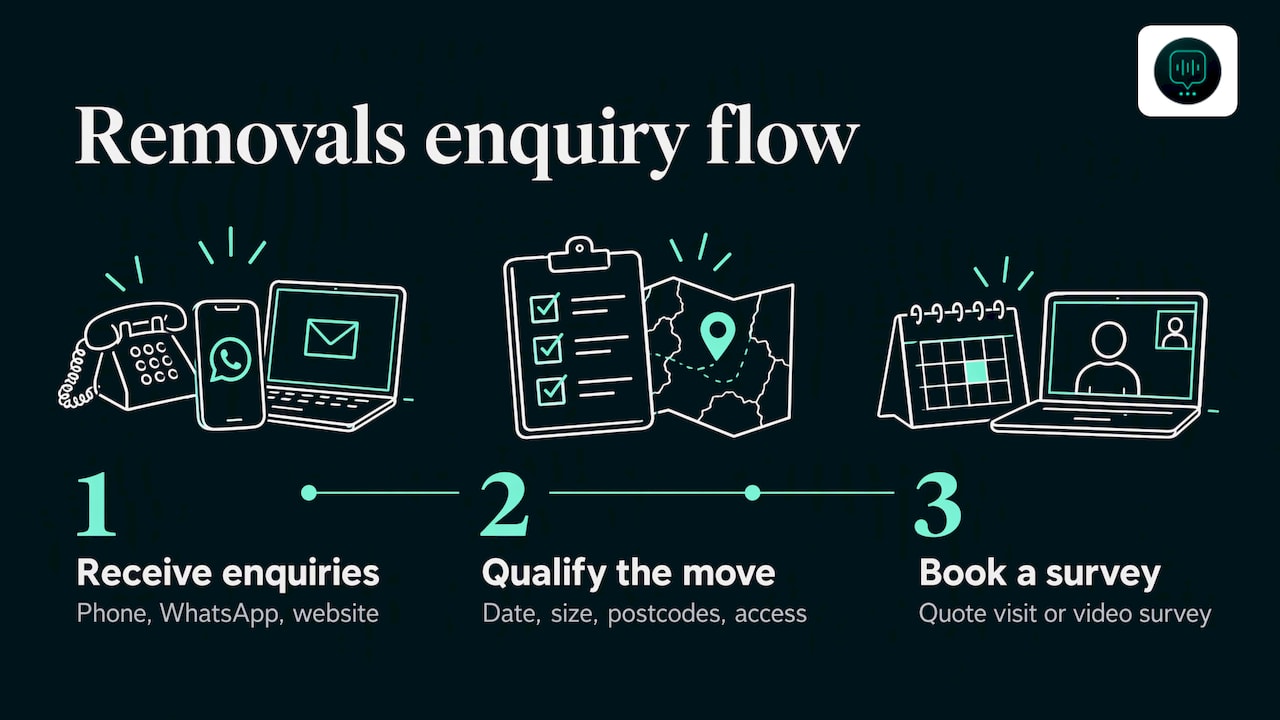
A removals firm in Croydon has crews out on a move all day. Quote requests come in by phone, WhatsApp and website. Customers often ask several firms, and the first to reply with sensible questions tends to be the one that gets the survey. The agent asks the move date, the size of the property, the postcode at both ends and whether there is a lift or a parking issue. It then books the quote visit or video survey. There is more on this in our page for removals firms.
A drainage firm in Sutton gets a call at 6am about a blocked drain and sewage at the back door. The agent marks the job urgent and routes it to the owner. A routine CCTV survey request, by contrast, is booked and waits.
For cleaning and pest control firms, volume is the issue. Lots of similar enquiries come in all day. The agent qualifies each one, and the owner sees the useful ones in a summary rather than a list of missed calls.
Who should pick up the phone and who should not?
You do not need to hand everything over. Many owners keep answering when they can, and let the agent take the calls they would otherwise miss: the ones on a roof, in a van, at a family dinner or in bed at 10pm. The agent handles those, and you stay in charge of everything else. You can also pause the agents from HQ when you want to take calls yourself.
If you want a wider view of how an AI receptionist suits a small firm, our practical guide for small businesses covers the setup questions.
What we think about the AI front desk
We built DeskAgent because trades owners kept telling us the same thing: the phone rings when your hands are full. A roofer on a ladder cannot answer, and a removals owner mid-move cannot take a quote request. The customer does not wait.
That is why we do not sell a chatbot you have to build yourself. DeskAgent is done for you: each agent is set up for your business and trained on your services, your coverage area and your FAQs. It qualifies by job type, postcode and urgency, sends urgent jobs to you and books the rest into the calendar.
We keep it honest. The agents sound natural, and they always say they are AI if asked. They do not promise a price or a time you have not set. The owner stays in charge, and DeskAgent HQ puts that control in one WhatsApp chat.
Our view is simple: a front desk that never sleeps should make you easier to hire, not harder to trust.
Monty Gordon, founder of DeskAgent
How much does it cost and how do you start?
DeskAgent® is a front desk for UK service businesses with 1 to 30 staff, with four agents (Phone, WhatsApp, Web and Inbox) plus DeskAgent HQ. You can start with one agent or take the whole thing.
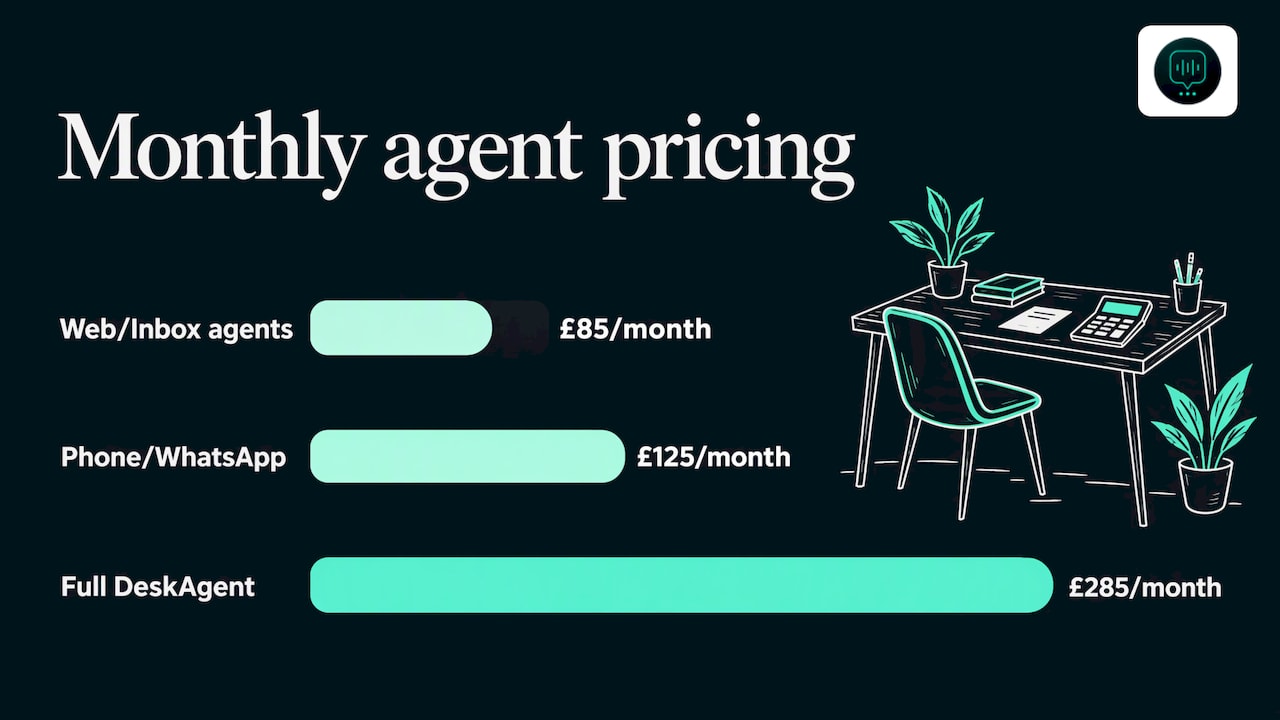
The Web Agent and the Inbox Agent are £85 a month each. The Phone Agent and the WhatsApp Agent are £125 a month each. Full DeskAgent, with all four agents plus DeskAgent HQ, is £285 a month. Single agents have no setup fee, because the first month covers the build. The Full DeskAgent 3-month pilot is a one-off £500 that covers the build and three months live, then £285 a month. There are no contracts and you can cancel any time. The pricing page has the current details.
If you would like to see it, you can book a free 30-minute demo: a call where we show an agent built for your business. For the call-answering side, start with the Phone Agent. If you would rather run the whole thing, take a look at DeskAgent HQ, which lets you check today’s leads and ask for summaries on WhatsApp.
FAQ
Will my customers know they are talking to an AI?
The agents sound natural, and they always say they are AI if a caller asks. They are not designed to pass as a person. Most callers want the job logged and a booking made, and that is what the agent is set up to do.
What happens if the call is an emergency, like a leak or a blocked drain?
You set an urgency rule for your trade. When a call matches it, the agent routes the job to you, with a summary of what the caller said. You then decide whether to ring back or send someone. For danger to life, the caller should ring 999.
Do I need to change my phone number?
No. The Phone Agent answers inbound calls on your existing business number via call forwarding. You forward calls to it when you are busy or closed, and you keep the number your customers already know.
Can it give a price for a roof or a move?
It works from the prices and FAQs you give it, and you can update them from DeskAgent HQ on WhatsApp. For jobs that need a survey, such as a re-roof or a house move, it books the visit, and the written quote comes from you.
Am I locked in?
No. There are no contracts, and you can cancel any time. Single agents have no setup fee, and the first month covers the build.